Aseigo

  • Subscribe to our RSS feed.
  • Twitter
  • StumbleUpon
  • Reddit
  • Facebook
  • Digg

Tuesday, 3 December 2013

30.6%

Posted on 02:39 by Unknown
I haven't seen the December issue of Linux Journal myself (yet!), but according to this blog entry KDE's desktop offering took 30.6% of the votes. That is twice the votes the runner up received which is a significant show of support from the Linux community. Thanks to everyone who voted, and congratulations to everyone who has helped make KDE's Plasma Desktop a reliable, performant and useful solution.

We are a diverse bunch in Free software and there are usually more than just a few options available to us. The multiplicity of options brings several benefits: competition, lessened risk due to single points of failure and an ability to focus on different use cases without devolving into lowest common denominator software to name three. However, sometimes there is more diversity than the user or developer base can support successfully. In such cases, the diversity prevents any one solution from gaining critical mass limiting the quality and capabilities of the software.

On the desktop side, having seen a variety of reliable industry numbers (not all of which were public, sadly) it was my understanding that Free software desktops were growing at a significant pace in the first half-decade of this century.  Since then, we've hit a stall point. There still is growth happening, but it has not been even. There are many reasons for this, the biggest of which are unrelated to the diversity we see in Free software desktop environments. 

However, the lack of a clear mandate from the users of Free software on the desktop has prevented any one desktop environment achieving the critical mass that would help to push through the ceiling we currently are pressed up against. Just how fractured support is can be seen clearly from the Linux Journal survey, which lines up quite neatly against every other survey I've seen in the last year.

During the time when there was more significant market growth for the Free software desktop, KDE software usually polled at 60%+ of the user base. The biggest shift in these numbers happened during the KDE 3.x desktop releases, well prior to the 4.x releases. Since that time, the numbers for KDE's desktop environment has remained generally constant. There was a dip right after the 4.0 release for reasons that have be well covered, but that was a set of issues which the community addressed on the way to realizing the vision for KDE Plasma. For for the last several years we've been idling in that 30-40% range of support.

This raises in my mind what is probably the obvious question: if KDE were to want to build on that 30%+ support shown by Linux Journal readers, what could we do to achieve that?

That is not a glib question that can be answered with "well, if someone just fixed bug X" type simplifications or  tired (and largely debunked) criticisms (e.g. "developers don't listen to users", "KDE software is 'bloated' relative to other options"). The answers (plural) will most likely lie within the social dynamics of the Free software user community rather than individualized wishes and guessing games. They are likely to not even be technological; I suspect most of the answers are social and industry related.

In closing, 30.6% is a terrific showing and shows KDE's central role in Free software desktop environments. But let's not stop there; let's us that as inspiration to go further.


Read More
Posted in | No comments

Wednesday, 27 November 2013

Improv and KDE

Posted on 05:45 by Unknown
When I announced the Improv ARM computer on Monday, I did it on my blog which is also syndicated to Planet KDE. That's because there is a very significant link between Improv and KDE.


People are shifting their computing time from traditional large laptops and workstation desktop systems across a breadth of devices. Not only are people using tablets and phones more, they are also using online services more and more.

For that least several years this trend has weighed on my mind in relation to desktop oriented Free software and, in particular, KDE software. How can we ensure KDE software can be where people are using computers today and tomorrow? I'll call this the Big Question.

The answer is not an easy one, in that it's actually a set of answers and it implies work for all of us. Some project teams within KDE, such as Plasma, Calligra, Marble and Kontact (among others) have been starting on addressing the Big Question. We've been creating software that can scale down to smaller hardware and creating user interfaces that work with various interaction patterns, such as touch, in addition to our traditional focus on the WIMP paradigm. Some have also targetted platforms and operating systems that are fairly foreign territory to be able to access the audience that use them; the port of Qt to Android can be seen as an effort in this line.

This is a lot harder, however, without hardware in your hands that you can easily work with to test your software on. So the Big Question leads to the Small Question: What hackable ARM-based hardware exists that supports KDE software out of the box?

Until Improv, the answer was simple: none.

Improv will ship to people with KDE libraries as well as Plasma Workspaces included. We will support that software, take bug reports, issue updates, etc. Community support is something we are fostering even now as well. We have an open build service farm that we've been using for quite a while now to create KDE packages for Mer OS for both ARM and Intel targets. There's even a Mer SDK you can install locally to get started on image creation if that's what you're interested in doing.

So if you'd like to be able to see how your software runs on a small ARM device; if you'd like to see how thin clients accessing your applications might perform; if you'd like to experiment with alternative form factors .. Improv is there for us.

Being able to offer a full computer for $75 that can run KDE software to an acceptable level, and in the process give a good impression of it to those using it, could be invaluable in promoting KDE technology to students and makers alike.

Improv is also great for non-GUI development. It makes an awesome whisper-quiet, low power server for the home or small office. These kinds of services, properly integrated with rich client software, is an area which will become increasingly important to the future of KDE and other Free software desktop software.

Improv is a product that can open the doors to the world of ubiquitous, device-centric computing for KDE. No more waiting for a big vendor to be kind to us and take our needs into consideration, no more buying devices never intended to run KDE software and try and shoehorn it in.

This is why Improv should be of prime interest to, and receive the support, of the KDE community and those who care about the success of it.
Read More
Posted in | No comments

Monday, 25 November 2013

Introducing Improv

Posted on 09:00 by Unknown
Improv: the powerful, open hardware development board


Make·Play·Live is happy to share some great news with you today: our first hardware product, Improv, is available for order today. As the name suggests, Improv is all about making new things. It is the perfect board for prototyping and creating small, powerful devices.

A combination of three attributes sets Improv apart from the crowd:

  1. Power: Dual core CPU, lots of storage, powerful GPU and modern software
  2. Modularity: Improv is actually two plug-and-play parts: a CPU card and a feature board
  3. Community: The feature board is freely licensed as Open Hardware, is supported with community infrastructure and contributes to the technologies on which Improv is based.

In broad strokes, this is what makes Improv unique and exciting. It is the perfect starting point for your hardware projects.


A view of Improv  from the business end of the card

Power

The hardware of Improv is extremely capable: a dual-core ARM® Cortex™-A7 System on Chip (SoC) running at 1Ghz, 1 GB of RAM, 4 GB of on-board NAND flash and a powerful OpenGL ES GPU. To access all of this hardware goodness there are a variety of ports: 2 USB2 ports (one fullsize host, one micro OTG), SD card reader, HDMI, ethernet (10/100, though the feature card has a Gigabit connector; more on that below), SATA, i2c, VGA/TTL and 8 GPIO pins. The entire device weighs less than 100 grams, is passively cooled and fits in your hand.

Improv comes pre-installed with Mer OS, sporting a recent Linux kernel, systemd and a wide variety of software tools. By default it boots into console, so if you are making a headless device you needn't worry about extra overhead running that you don't need. If you are going to hook it up to a screen (or two), then you have an amazing starting point with choices such as X.org, Wayland, Qt4, Qt5 and a full complement of KDE libraries and Plasma Workspaces.


Improv unplugged undocked

Modularity


Improv takes advantage of the open EOMA68 standard to deliver a unique design: the SoC, RAM and storage live on one card (the "CPU card"), the feature ports are on a PCB it docks with (the "feature board"). The two dock securely together with the CPU card sitting under the feature board nestled in a pair of rails; they are undocked from each other by pushing a mechanical ejector button.

This means that you can use the CPU card separately from the feature board, have multiple CPU cards for different projects or even upgrade your Improv as new CPU and feature boards become available. Not only is this better for the environment, but it gives you ultimate flexibility.

The software is similarly easy to bend to your will. You can boot into the included Linux-based operating system and decide whether to stay at console or fire up a full OpenGL accelerated graphical environment. Or you can choose to boot something else entirely from the SD card slot, via the USB OTG port or by flashing a new bootloader and/or OS image to the built-in NAND.

Additional hardware add-ons such as VGA connectors, keyboard kits and cases are also in development and rely on the openness and modularity of Improv. Through its modular design, Improv is designed to last and grow.


More than just a product, Improv promotes community

Community


Improv is the result of a community effort. Collaboration within the EOMA68, Linux netbook and ARM communities helped to deliver and prove the hardware design, while working with software communities such as Mer, KDE and Linux have allowed us to deliver amazing software on top of that hardware.

Production, branding, marketing and retail are all enabled by collaborative interaction within Make·Play·Live's Partner Network. Via this network, we bring together individual community participants as well as entrepreneurial and corporate support, without which Improv would not be possible.

The schematics for the feature board are licensed under the GPL and will be made available in tandem with shipping so that you can learn about the design and even extend it in new ways. We are also ready to help motivated makers who come up with great ideas for new feature boards, add-ons and entire devices through the process of prototyping, manufacturing and delivery. This is not a device you buy and are then left on your own with. Improv is a starting point from which to create amazing things that can take flight.

To support you in this, we provide sleek online discussion forums, the Open Hardware Registry (OHR) and the Mer Community Open Build Service (COBS). The forums are administered by Make·Play·Live community members and provide a place for people to discuss projects, ask questions and share answers. OHR allows makers and vendors to register globally unique IDs for their hardware projects, much as the USB-IF does for USB, only without the fees, bureaucracy and limited ID space. The Mer COBS, which is jointly sponsored by Make·Play·Live and Jolla, provides an effective way to build and distribute software for Improv.

This is only the start of the community infrastructure to support your needs as makers. Videos on Youtube showing tricks, techniques and project ideas for Improv will appear weekly. These will feature people who were key in the development of Improv; in time, we will also feature videos highlighting community contributions. Future plans include infrastructure to help you share your hardware projects with others, a community driven knowledge-base and local user groups supported with project concepts and planning.


Creating sustainable models


One of the biggest challenges we have identified in the free software and open hardware movements when it comes to consumer and mobile devices is sustainability. Hardware costs serious money to produce and involves engaging with a supply chain that can be challenging to work with. We know, because we have spent the last two years working on some ambitious open hardware projects.

From that experience we have built a network of hardware, software, procurement, manufacturing and branding expertise. Starting with Improv, we are opening up that expertise to others who would like to turn ideas into reality.

Improv is also an opportunity for us to invest resources into relevant free software and open hardware development. The Mer Open Build Service, for instance, will be partially funded by proceeds from Improv. Software developers and open hardware designers working on similar projects will receive continued sponsorship and funding thanks to sales of Improv. Ultimately, we expect new products to spring up as others use Improv, continuing the cycle of building sustainable models in the open device world.

When you purchase an Improv you are not only getting a truly great device to work on, you are also supporting the process of creating quality free software, open hardware and the services which will enable others to do the same.


Elegance, freedom and power in one package.

"Shut up and take my money!"


Improv retails for US$75 plus applicable shipping and taxes. That includes the feature board, the CPU card and a commitment to engaging and fun makery from us to you.

We will start shipping to North America and Europe near the end of January on a first-ordered, first-shipped basis. Needless to say, each manufacturing run produces a limited number of Improvs and we expect the first lot to sell out quickly. To order your Improv today and get in on the first public shipment of devices, visit the Improv information page and click on the purchase button.


Read More
Posted in | No comments

Sunday, 24 November 2013

Kate has won

Posted on 12:12 by Unknown

A couple of weeks ago Martin Gräßlin noted that I use vim and not Kate in a G+ discussion. Suitable shown up, II decided to give Kate another serious run. I do this every couple years, and it has indeed gotten better every time I've used it, but ... you have to understand that I'm fighting a long term addiction to vim here ;)

So I checked myself into editor rehab and forced myself to use Kate on two projects recently. I have to admit that I'm a convert. A lot of the keyboard controls I'm used to from vim translate over to Kate; if I turn on the vi mode in Kate it gets even better.

What really sold me though were two things: sessions, and the built in command lines (plural).

Kate lets you give am editing session a name. You can open and close sessions, and Kate tracks the files you have open, etc. There is also a Plasma widget and krunner integration, so I can now hit alt+f2 and type "kate" to see all my saved sessions. With autocompletion, of course! So: alt+f2, "kate mpl", , bam! right directory, 30+ files open. Beauty.

The other must-have for me are the command lines. I live and die by the terminal, so having one around is crucial. Kate allows having a Konsole session right in the editor window. This is collapsable, so it doesn't waste space when i don't need it, but is always right there when I do. The killer feature is that it follows me around as I move between files in the GUI. I can do all my git foo, scp'ing, grep/find'ing, etc. in that window, of course, but perhaps the best thing is that `kate ` opens the file in the kate window, adding it to the session. My workflow is preserved!

There is also another command line in Kate: the Kate command line. This lets you tell Kate to do things with nifty little commands. As a vimmer, this feels so very, very natural. :)

A lot of things I'm used to doing quickly in vim can be done quickly in Kate. It's not 100%, but then Kate is better at some things compared to the default vim, too. For instance, Kate has the filebrowser sidebar with all the usual KDE goodness such as breadcrumbs, autocomplete, etc etc. Kate is fast, scriptable, detects files changed behind its back, autorecovers if your X session dies (not that that ever happens to me when working on things like the lock screen with X screensavers *cough* *cough*). It also has those nifty over scrollbars and various gewgadgetry that is just little sprinkles on the cake.

Not that I won't use vim from time to time still ... (he writes, looking at his various ssh sessions in various konsole tabs...)

Read More
Posted in | No comments

Friday, 22 November 2013

what trains are for

Posted on 14:18 by Unknown
Today I had to go to Milan .. and back .. by train. That's a total of eight hours planted in a moving seat. I won't explain why I had to do this crazy little trip (it's related to our announcement on Monday) but there I was .. at least I had a power plug and a table to myself. Which meant I could catch up on various bits of work, and when I needed a break from that I happily hacked on random Plasma bits.

One thing I did was clean up some issues with the lock screen. The new QML based lock screen would show the password dialog even if you had set it to not require a password. There was also some fun you could have by connecting a second monitor, something I only noticed while reading the code fixing the first issue.

One tester noted a bug in my first run at this, so this evening once back home I spent some time pounding on it in every direction I could. I can no longer get it to misbehave, so that's a good thing.

There's also a patch on reviewboard, thanks to Thomas Lübking, that should get pushed shortly that improves the screenlocker when using multiple screens and the (legacy) X screensavers.

Given the nature of the screenlocker, it would be great if those of you testing pre-releases could also keep an eye on the screenlocker for new unwanted behaviors that may be introduced by these changes. As I said, it works well here and it's been tested by at least one other person already ... but more eyeballs equals fewer regressions.

In any case, that's one more set of issues that are cleared up for the Plasma Workspace 4.11 long term release. The fixes are not streaming in at an alarming rate, but they are trickling in at a nice steady pace, which is the entire point of these things.
Read More
Posted in | No comments

Thursday, 21 November 2013

bodega: partners, aggregating audiences and YOU

Posted on 08:19 by Unknown
I did a quick screencast today showing what "partners" are in Bodega and how they work. It's one of the many ways that Bodega is a little bit different from other similar systems and as such a screencast can't hurt to help people understand how it works. I will cover other aspects of Bodega in future, so feedback on what would make these videos more useful to you is welcome.


A primary concept with Bodega is that of audience aggregation. Many of us have audiences, but few of us have big audiences, and even fewer have huge audiences. Unfortunately, the economics of selling content only works with larger audiences and even for those who aren't selling stuff it's often more of an incentive when your audience is larger.

Since Bodega can host all kinds of content and then show only selections of that content, it naturally allows for content aggregation. To understand why imagine that there are three solitaire card games which have configurable backgrounds, card deck graphics and game rules. Each of them uses similar image files to decorate the cards shown on screen, but each of them uses a different file format to describe how the games work. Now imagine that all three of these projects integrate Bodega into their game to allow people to get new card decks, backgrounds and game rules.

In Bodega, people could happily publish backgrounds and card decks. The backgrounds might just be regular ol' wallpapers, or they might be a specific type of image for board game "mats". Other people could publish game rules that are specific to one of the three card games. While the backgrounds and card decks would have a common tag noting what they were, these game rules would be tagged with the applicable game.

A card game developer would then create a store in Bodega that shows all backgrounds, all card decks .. but only the game rules for their game. Each of these could be put into a separate channel in their store so when the person playing Mystery Science Solitaire 3k presses the "Download card decks.." button they see just card decks and not backgrounds or game rules.

Everyone is happy .. but something interesting has happened in the process. Instead of trying to motivate an artist to make card decks for your special card game, they just have to be motivated to make a card deck for any of the card games. Perhaps they'll be more motivated if they know that their work will show up in multiple applications and therefore get in front of more people. Probably, right?

In such a case, the artist doesn't even need to know about Mystery Science Solitaire 3k to make it better, so the app developer also wins.

Now .. forget about card games for a moment and think about entire Linux distributions. Or independent musicians and authors. Or small device makers. Yeah.

Together we can aggregate audiences and increase the sustainability of each of our interests in the process. The key word is together.

We're going to be writing a "integrating a Bodega store into your system" HOWTO and then I'll be making it my mission for Q1 2014 to get as many projects, people and companies doing exactly that. Between now and then, I'm looking for early adopters that we can work more closely with to refine that HOWTO.

If you are involved with a project that you think Bodega integration would be perfect for, please contact me by email at aseigo at kde.org. Your project can be web based, focused on the traditional desktop or mobile; it can be a single application or a bigger system. All I ask is that it has had a public release and has some user base already, even if small.
Read More
Posted in | No comments

Friday, 15 November 2013

#merweek

Posted on 12:42 by Unknown
Make·Play·Live's website is counting down to ... ?


As Dario Freddi noted in his G+ stream today, the week of the 25th is shaping up to be #merweek. There will be not one, not two but three product releases that week featuring Mer OS over the course of the first three days of the week from three different companies, all of whom contribute to Mer OS. It is going to be an exciting, fast, hot week for anyone interested in embedded and mobile devices, whether as a user or a maker. 

We'll be kicking off the festivities on Monday morning at 17:00 UTC (09:00 PST) as we unveil the first Make·Play·Live product, at long last. The only thing I can reveal right now, other than it uses Mer OS by default, is that it is not a tablet. 

For everyone waiting for Vivaldi: We have not discarded the tablet concept. In fact, the final product is frustratingly close to completion but we missed the the holiday season time window. The Vivaldi journey, however, was crucial for informing the product we will be making available on the 25th.

Supporting this announcement will be a brand new Make·Play·Live web site, which currently is counting down the seconds until 17:00 UTC on Monday the 25th. This new site will serve as a visible hub for the business network we've been putting together throughout 2013, a place for those looking to harness the capabilities of the Bodega content system to get hooked in and productive as well as a community gathering and support node for .. well .. you'll find out on the 25th. ;)

The day after that, Ispirata will be releasing a device development system designed for embedded systems needing quick development and long term support which they've christened Hemera. The day after that Jolla has their product release.

It's going to be one hell of a week ... #merweek
Read More
Posted in | No comments

Thursday, 7 November 2013

fewer "omg what did i just do?!" in plasma desktop's panel

Posted on 11:34 by Unknown
In Plasma Desktop, some people (clicking wildly, apparently) sometimes right-click click in a random spot of the panel and get the widget's context menu. This includes a "Remove this " entry with a big red "x" icon, but they click on it anyways and *poof* .. there goes their window list (or whatever).

Since Plasma Desktop 4.x is in long term maintenance mode, which means we're supposed to be making it more stable and reliable, I figured I'd spend a few minutes thinking about this problem. So I set aside one of my morning showers for this. Now you know what I do in the shower. Other than clean myself, of course. :) This probably explains my moderately frequent half-hour showers.

So ... exercise in problem solving time! Do we:

a) Always start Plasma Desktop in "Locked" mode?
Bad answer: it means that to do almost *anything* with your desktop you now need to unlock it. Many features become hidden and the user is robbed of discovery opportunities.

b) Lock just the panels!

Not only does (a) apply, but this introduces huge complexity .. and not just in the code (where now different containers need to be treated specially) but also for the poor end user who now has to figure out how to lock/unlock every freaking part of their desktop separately.

c) Allow the panel to tell the widgets when not to show their close item in the context menu. Then, when you click on the toolbox icon which gives you access to various configuration settings, have the panel tell the widgets that they should now show the remove item.

We have a winner! 

Apparently it's not the most obvious idea in the world as people have been clamoring for (a) and/or (b) for some time and to my knowledge *nobody* has suggested (c). As a maintainer, my first job is to say "no" to ideas that will have undesirable side-effects. My rather less important second job is to identify (or in a worst-case-scenario, *gasp* come up with ;) ideas that will work .. or at least not fail. (The two are not always the same thing.)

I've been saying "no" to (a) and (b) for a while now, while suggesting that if someone can come up with a better idea, let me know. Well, it ended up in the shower and answer (c) was the result.

How much work would this be? One line in libplasma (checking a value) and three lines in the plasma-desktop shell (toggling that value in time to the configuration UI). Yes, a whopping four lines of code.

This demonstrates two things:

  1. Plasma is amazingly flexible and designed in such a way as to make implementing solutions to problems easy
  2. That the real work is often in realizing what the solution is in the first place
This improvement will land in the next maintenance releases of kdelibs and kde-workspace.
Read More
Posted in | No comments

Tuesday, 5 November 2013

panel.autohide = true

Posted on 07:50 by Unknown
I tend to use Plasma Desktop in its default configuration since that is what most people are subjected to. However, when I first started contributing to kicker (kde2/kde3's panels) I started doing so because I used autohiding panels on multiple screens and .. there was  room for improvement. Since autohide panels are not the default, I no longer used the feature on a daily basis; basically only when bugs were reported would I turn it on.

Well, I decided to spoil myself the other week and turn on autohide on my one lonely panel. Besides having that screen real-estate back for the first time in many years (ok, on a 19" monitor it isn't that much real estate. ..) I got to enjoy all the improvements that had accumulated.

There is the nice blue glow that appears and intensifies as you move the mouse closer. These days this is a kwin effect and boy is it nice and smooth. It's the kind of feedback I could only have dreamed of with kicker.

The next thing I noticed was the hiding animation itself. With kicker we just moved the panel around visually on-screen. This was very funny when you had two screens next to each other as you could watch it move from one screen ... to the next! See, it wasn't really hiding. We fixed that with Plasma Desktop: it actually really hides now. We went one step further and delegated the animation to the compositor. This allows it to be silky smooth and take as little CPU as possible. Ah, performance ...

With kicker, autohide panels would wake up the system a number times per second. This was because it polled for the mouse position to know when the mouse hit a screen edge. Waking up a process means waking up the CPU, which is not good for your battery, and it means keeping it always resident in memory which impacts the performance of multitasking. It's much better when process remain silent, and so with Plasma Desktop we use input-only windows and XEvents to trigger the unhides. Beauty.

Well .. sorta. These input-only windows can interfere with other windows in specific situations, though we've minimized those cases over time. Still, we're going to make this better .. and get rid of the X11 dependency all at once (which is important for supporting Wayland) by moving screen edge handling to the compositor, which in our case is, at least by default, KWin. This means that the compositor will be able to coordinate the desktop shell's screen edge needs with the window managers with .. well .. anything that needs screen edge handling. All without fusing the shell and compositor.

One more gripe I had with kicker is that if you were especially evil (or just unlucky) you could trigger subtle bugs with the hide/unhide mechanism. I worked a lot of annoyances and bugs out of that code, but it was never quite 100% perfect in 100% of cases. So far, I've been unable to trip up Plasma Desktop's panels. Yay.

So autohide panels may not be the biggest feature or the most required feature, but it's been a nice little frill for me these last couple of weeks. :)

Update: I totally forgot to mention what is probably my favourite feature of all: now whenever there is a notification  or something requires your attention, the panel containing it automatically unhides so you notice and then re-hides itself ... unless you aren't interacting with the system. In that case it stays unhidden until you move the mouse or type something (or generate some form of input) .. so you never lose a notification just because you were away from your desk. MAGIC!
Read More
Posted in | No comments

on introducing new ideas to free software communities

Posted on 07:28 by Unknown
Over the last two weeks I've gone through two "new idea introductions" with two entirely different Free software/hardware communities. (I used the word "two" three times in that sentence, and were I a slightly odder sort of person I might try to use the word "three" four times in this one but I'll refrain at just three. ;) Both went fairly well, and perhaps that's because it was not my first time around.

I've had my fair share of opportunities to introduce new ideas to a Free software communities in the years I've been a participant. In the process, I've learned a number of "do"s and "don't"s (the hard way) and I thought I'd take a moment to share some of them here in hopes someone else might find them useful.

Tell the community first. This may seem like an obvious one, but I can't count the number of times I've seen someone waltz into a community's common area and tell everyone what they had just done in hopes of support. Without naming names, I saw this done just last week and it turned out rather poorly.

There is a saying that goes, "it is easier to ask forgiveness than permission". However, when it when comes to introducing plans and ideas to a community, this is often very bad advice. It too easily puts people into a position where they feel a binding decision has already been made on their behalf, and when that happens people often stop listening effectively and start talking loudly. This is, needlessly to say, not good for communication.

There are even people who will push back on the idea simply out of principle, no matter how good the idea is, as a means to reclaim their (or the community's) right to input and dissent.

It is therefore far more effective to approach with a proposal rather than a decision. It is also usually far wiser to do this before actions that may appear official or binding are taken. Even if you've done a lot of work already on your concept / idea / implementation, approach the community with the humility required to present it as a proposal rather than a statement.

This is actually an area of constant conflict-creation which I attempted to improve over at freedesktop.org ... to no avail. My proposal was accepted in words and reject in actions, despite over a year of patiently working on the concept in an open and collaborate manner. That brings us to the next point quite neatly:

Be prepared for "no". Sometimes people will reject an idea. Sometimes that idea will be a really, really good one. Sometimes it won't. You'll always think it is a really, really good idea though otherwise you wouldn't have proposed it, right? ;) That can make accepting "no" really difficult, but it is important to realize that you can't force a community without breaking it.

This doesn't mean you have to take the first "no" as the final answer, however. Usually "no" comes in the form of a question or an objection. Be ready! Before presenting your idea, play your own devil's advocate and think of all the ways you might counter your idea. Better yet: present your idea privately to a friend or three that you trust and have them take a good, hard run at it. This will help you be ready for when you get a "no", because that will enable you to more effectively: (... hello, segue!)

Engage in dialog. When presenting an idea, others may have valid ways to improve it. They may be able to inform you how to make it more appropriate for that specific community in ways that may not make it better but may make it more contextually suited for that community. So pay attention to what people say and really work in the good ideas that come in, even if at first you may feel protective of your idea just the way it is.

If the idea you're pitching is not a simple one, people will often not understand it right away. They will offer feedback which may be less than informed or ... overly brilliant, shall we say. Be patient and respond to the misunderstandings factually and patiently. To be honest, I really struggle with handling those situations constructively, but have improved incrementally over the years. (.. or at least, so I hope.) I've found that this skill is one of the most important ways to turn an initial "no" into an eventual and enthusiastic "HELL YES!"

So when I say "engage in dialog" I mean it as a two-way street where everyone gives and receives. Don't assume an outcome or you may find yourself unable to engage in dialog truthfully, and people will pick up on that and when they do they tend to respond poorly.

Communicate your journey. In the process of dialoging, be sure to share your journey: how did you arrive at the idea, what obstacles have you faced (if any), how much are you invested in this idea. If you share the "how I met your mother" version of the story, people will more easily be able to travel that same journey in their mind that you did in yours. When your realize that it was the journey that took you to the destination, the reason to share that journey with others should become obvious: it helps them arrive there too.

Open, honest, transparent ... I've found that in presenting ideas, it is really hard to "overshare". If people feel you are holding back, they will often assume the worst about what you are holding back. Some people have really sensitive "bullshit meters", and unfortunately other people have really broken ones. Those people tend to perceive bullshit where there is none. Otherwise, they tend to be nice people. ;) Transparency helps bring those barriers down and is a key ingredient in engaging in dialog.

Still, be prepared for "no". Even after extensive dialog, sometimes the "no" remains "no". Maybe the idea wasn't so good after all, but don't just assume that: ask for feedback to understand why it was perceived that way. Take that feedback and tuck it away, don't re-open dialog at this point, you'll just annoy people with endless discussion.

Maybe it was the wrong time for the idea. If you feel that's the case, hold on to the idea for when it is the right time. There's a careful balance to be found here though: if you keep bringing up your idea every few weeks, you're (again) going to annoy people. Annoyed people don't accept new ideas very readily.

Or perhaps it was the wrong community for the idea. If you feel the timing is right and the idea is worthwhile, shop it around to other communities. Never be afraid to join a new community if that is where your awesome ideas can find fertile soil. Sometimes we allow ourselves to be anchored to the communities we are in due to sentimentality, comfort, etc. when we really ought to be looking for opportunities for our great ideas to bloom. This, by the way, is why it is critical for communities to provide ways to introduce ideas and experiment: if you are closed, your best idea people (that you didn't even know you had) will find better ways to spend their time.
Read More
Posted in | No comments

Monday, 28 October 2013

distributing content with bodega

Posted on 07:10 by Unknown
In my last blog entry I wrote about how to publish content with Bodega. This is separate from distributing that same content, and the reason for that has its roots in some rather straightforward economics which I won't go into here for fear of boring everyone to death. Perhaps on a later day if people are interested, but today we're going to look at the process of distributing content.

Audiences


The easiest way to grasp how Bodega goes about things is to think in terms of audiences. Creators and publishers of digital works are on the lookout for an audience, people who want what they are making. The currently dominant method for finding an audience is similar to horse ranching, old school style.

Picture if you will: The plains are full of horses that travel in smaller or larger herds. These horses roam where they want and do what they want in their own happy, wild way. They are of no use to the rancher in this format, however, so he sends out a group of cowboys to round up these wild horses, put them in small fenced enclosures and then tame them through a method referred to as "breaking". The rancher then carefully tends his ever growing herd of broken horses within the bounds of his ranch, claiming that these horses are now his. Would-be horse owners (including other ranchers) can buy his horses or go catch and break their own wild specimens. How wonderful and romantic.

Today most distribution is based on the concept of a captive audience, which is a slightly kinder sounding phrase for describing the process of rounding up people's attention, forcing them into corrals (or as they are sometimes called "walled gardens") and then guarding the amount of attention they've managed to capture. This audience is then sold to creative types (or the people who represent them) as a way to get their stuff to people. Maybe even make a buck or two in the process if you're lucky.

If it sounds like a tough business, it is. It also has a very strange side-effect that I believe is generally unintentional: it makes it increasingly difficult for small audiences and self-representing creators to find what they are looking for. The Big Rancheros are just trying to make their business successful, what happens to the minnows is not much their concern.

Bodega tries to reimagine how the distribution process might work by adding a neutral party into the midst of all that machinery. Instead of the distributor also owning the catalog, the catalog in Bodega is managed by the warehouse team ... but the warehouse does not engage an audience. The stores, which pull content from the warehouse, do that.

Distribution in Bodega is done in an open market (though we've only scratched surface of possibilities there, to be honest) and each distributor ends up aggregating their audience with all the other audiences from the perspective of a content creator or publisher. This makes it as realistic for small audiences as big audiences to be serviced and for independent creators, even those focused on very tightly constrained themes, to find audience as well.

Distribution is a part of the life-cycle, not another life-form


We don't much believe in dualities of convenience, and this is reflected in Bodega. When you become a participant with a Bodega warheouse, you create partnerships. It might be a partnership of just you, or it might be a partnership of you and your 10,000 best friends. The Warehouse doesn't manage this: you do. A partner may publish content into the warehouse, and that same partner may also distribute content from the warehouse.

This is common sense, really: if you write books and make them available in eBook format, you may wish to make them available for download and purchase on your website. In doing so, you are a distributor, albeit distributing your own goods. At the same time on the other side of the virtual world, another Bodega partner group with a completely different audience to yours may also be distributing your eBooks. You get the fee (if any) you put on your goods, but you no longer must build intentional relationships with others for distribution to their audience.

Distribution is therefore an equal part of the life-cycle of created goods, rather than a means of control.

Designing a store

Stores in Bodega are collections of tags. As a store owner, the first question you need to answer is: What kind of content do I want to make available here? Next: How do I want that content arranged? 

For the Plasma Active Add Ons store we decided we wanted to start with the following content:
  • books from Project Gutenberg
  • wallpapers
  • applications
  • desktop widgets
So those became our top level categories, or in Bodega store-speak, "channels". Under the books channel, we created sub-channels for books organized by author, by title and by topic. Under those, the books are grouped alphabetically. (There are well over 40k of them, so such grouping is necessary). Those last channels were defined using tags, just like assets are described. So one of the channels has the following tags associated with it:

  • author: project gutenberg
  • type: book
  • descriptive: author last name starts with 'A'
Bodega then does its magic and automatically organizes all the assets that match those tags into that channel. Yes, this means you can arrange things however you wish, have assets appear in more than one place, etc. It also means you set up your store definition and content put into the warehouse automagically shows up in your store structure. You can, of course, have as many stores as you want; virtual real estate is surprisingly cheap.

Since you control the store presentation, you can define things like content ratings to be carry or geographic focus. The warehouse stays out of those decisions as it's a final presentation question for the store owning partner.

I can haz curation?

The curious may ask "what prevents someone from just tagging their stuff as a Project Gutenberg book?" the answer is deliciously simple: that specific tag is owned by the Project Gutenberg parter. As a result, only the get to use it to describe assets. So you can't just tag your stuff with someone else's identifying tags. Other tags, like "author last name starts with 'A'" or the content rating tags are shared (not owned) so everyone can use them.

The truly curious may then say: "So, can I own a tag that only I can put on other people's assets, and then use that for curating content?" Answer: yes. This feature is not neatly exposed in the management application yet (it will be soon), but each and every partner which engages in distribution gets a "Signed off by" tag created for them which they can use for this process.

So while people may be throwing content into the warehouse, if you really care enough to do so you can go through and do curation. Using tags. Because everything must use tags. ;)

Business models

Partners who publish things to the warehouse set a base price for those assets. Distributors define a rate to add onto that base price. That mark-up goes to the store owner as profit as an incentive (and a thank-you) for bringing that content to their audience.

It's just like the Big Rancheros, only without the fences holding the horses in so they can be broken and then treated like cattle. Run free!

Location, location, location


So where can you set up a store? That's entirely up to you. Store structures are shown to people using a Bodega client, such as the Plasma Active Add Ons store. Since the Bodega warehouse is its own independent entity, it does not actually itself render the user interface of the stores. It just provides the API for clients, or "storefronts", to do so.

This means that you can put a Bodega storefront in the middle of your cool video game in a way that blends seamlessly. You can use it to deliver add-ons to your desktop or mobile application. You can put your storefront in a webapp on a consumer device like a network router, a PVR or a weather station kit (to pick three strange things). You can use it to show a store on your website. You decide where the store goes.

We have created a C++ library and a QML based application that makes that easy for people using Qt in their products as we do. A stand-aloneweb client is in the works, and we're happy to work with anyone who'd like to render a storefront in the language, toolkit or medium of their choice.

We did it this way because as the partner with an audience, you know how to best reach your audience, and one-client-does-not-fit-all. You don't even have to let on that it's Bodega in the background. It's a level of customization that puts to shame most other stores' claims to being "brandable".
Read More
Posted in | No comments

Thursday, 24 October 2013

publishing content with bodega

Posted on 09:05 by Unknown
The other day I wrote about Bodega, an open market for digital content. It was impossible to get everything into one blog entry, however, as Bodega engages with people in three different ways: as consumers, as creators and as distributors. In that previous entry, I focused on what Bodega is to you when you are interacting with it as a consumer. Today we'll be exploring Bodega from the perspective of a content creator.

Warehouses and Stores


As a creator, Bodega strives to empower you. Most of the digital content systems that currently exist have you give your content to a publisher then controls where it can be delivered on your behalf. Unfortunately, this usually means that when you upload something to a specific online store, that becomes the only place people can get it from. 

This is actually a fairly odd result if we compare it to how things works in the atom-based economy. Out in the physical world, people make things and they tend to pass it through a wholesaler to distributes it to multiple retailers. Rarely is the creator tied into any sort of exclusivity with the wholesaler, and retailers tend to have choices in their wholesale partner. Today's online content systems work a lot more like Walmart: warehouser, retailer and often looking for exclusivity. Walmart's model is good for Walmart, but often not so much for others.

With Bodega, there are no exclusivities, no accidental platform lock-in. You put your content in a digital warehouse where it sits with all the other things people have added to it. The warehouse is run by the server and its job is to orchestrate between creators and distributors. When you add content to the warehouse, a process we refer to as publishing, it becomes available for stores to display. The warehouse itself, however, is not the store itself.

What this means in practice is that you can publish your content in one place and multiple stores may choose to carry it. (Or not .. it is up to the store owner, but more on that in the next blog entry.) You may even choose to open a store for your own content. Consider the following scenarios:

Let's imagine a fellow named Joe. Joe writes technical books covering software he knows quite well. He'd like to publish his work, but his choices are limited. He can put it on RainForest, the giant bookseller website, and let them take a large portion of the profit. This doesn't seem very fair because most of the people who want Joe's books know about them because Joe promotes his work into the relevant communities. RainForest is just a transaction provider at this point, but making money as if they were a retailer. So instead Joe puts his books into a Bodega warehouse and then opens a Bodega store on his website. Without having to handle transactions, downloads or anything like that, Joe is now selling his books and keeping nearly the entire sales price. That itself may be good enough, but then the real magic happens: Make·Play·Live's store which can be accessed on Plasma Active devices, includes Joe's books. Joe may have no idea what Make·Play·Live or Plasma Active is, but his books have found another outlet. Joe may decide to co-promote some books from his fellow authors, and selects some of them to show up in his store on his website as well; Joe makes a small commission on those sales as well .. but more on that in the next blog entry.

Now let's meet Alice, who is a software developer targeting Linux. She'd like to put her software in an "App Store" but sees that there is one option but it only services one distribution and doesn't seem to turn much volume. She bemoans the fact that even though her software runs on all sorts of distributions, there's no way to get it there without somehow getting her application in each distribution's package management system, and even then it really is not the same user experience as an App Store provides. So Alice decides to put her applications into the Bodega warehouse, and since any distribution can have a store that uses that warehouse her app is no longer stranded in a "one distro" solution. Multiple Linux distributions can provide access to an entire App Store, and by bringing together these dozens and dozens of smaller markets, Alice can start to see distribution reach that makes sense.

Oh, and those distros also have Joe's books .. because they're awesome too. This is the next step in the evolution of online content distribution mechanics, and it is driven by the simple idea that the store should not also be warehouse.

You choose the type, you describe your content


When you publish content into the warehouse, you have a lot of control over what happens at that point. This starts with the type of content you are uploading. So if you are publishing an application you might see this:


It knows to ask you for the platforms it supports, category (e.g. 'Education' or 'Communication'), a content rating (Everyone, Adult, etc) as well as screenshots and icons. Great! But what if you are publishing a book?


Aha! Now it has fields for front and back covers, and skips the platform thing. The magic here is that this can be done for any kind of content. You can add your own tag of type "assetType" and then use that for your content. The warehouse managers can then promote your type even further by defining the tagging and image rules. (In future, I'd like to have even this step able to be done by content partners.)

Bodega has no internal bias as to what kind of content it hosts. So if you want to publish Battle for Wesnoth add-ons to a Bodega warehouse, you can.

Beyond these basics of type and essential tagging rules, you can then go about tagging your content with all relevant tags. There are mimetype tags, language tags, descriptive tags, genre tags, author tags ... these tags help stores know how to organize things into nice arrangements and people can search by these tags, so it is quite important to be accurate and comprehensive. When you add a tag that does not exist, it is automatically created for you. You can add, edit and remove tags at any time.

More on this process can be found in the Manager app documentation.

Setting your price


Pricing is obviously part of describing your content, but I wanted to cover it separately since it often is the source of some confusion, so I'll try to be extra clear.

You don't have to put prices on your items. You are welcome to make your things available at no cost.
If you do set a price, that's what you get. Store and warehouse spiffs are added to that. They do not come out of the price you set. You are defining how much you want. The final price includes the store markup, and typically that means you end up with 70-80% of the final sale price.

You can sell things which are licensed under Free culture terms. Just because your software is GPL'd or your wallpaper is CC BY-SA does not mean you can't put a price on it. People buy bottled water all the time. Why? Convenience. Bodega is a convenience for people, and on top of that .. a lot of people also get the idea that just because something is "libre" does not mean you didn't put effort into it and so it should be "gratis".

Otherwise, there isn't much to say about pricing.

Partners


An interesting feature of Bodega is the concept of "partners". While you use your normal everyday Bodega account to log into the manager application, to start publishing content you have to create or join a partner. Partners allow multiple people to work together on content, both for publishing and for stores.

You don't have to ask for permission to create a partner: it's as simple as going to the Partners tab and hitting "New Partner". To get going with publishing and distribution (more on that in the next blog entry), you hit the "Request" link; this is there to ensure that the terms of service are understood and accepted and so that people don't use Bodega as a personal backup solution. ;) Typically requests are approved by the warehouse the same day.

With a Partner set up, you can assign different roles to different people within the partnership. These roles include:
  • Partner Manager: Partner information, members and role assignment
  • Store Manager: Creating and managing stores
  • Content Creator: Creating and managing assets
  • Validator: Content approval and curation
  • Account Manager: Managing the financial aspects of the partner (e.g. bank accounts)
You can be a member of more than one partner, and there is no limit to the number of people in a partnership. If you're a one-person "partner", then you get all these roles to yourself (automatically, in fact). For cooperations, however, this role splitting can be very handy.

Following the action


The manager application also provides access to a variety of statistics so you can follow the success of your assets: how many downloads, how many purchases, how much earned. Using the nice built-in graphs you can compare multiple assets and control the time frame you are looking at.

Each asset you upload also gets a tag in the discussions forum and it becomes available for rating by other Bodega participants. We'll be adding to these tools over time as we feel this full communication cycle is really important to both creators and consumers alike.

Ok, but how does this all come together?


So far we've looked at the benefits for people using Bodega to get content and people adding content to the Bodega warehouse. How does this all come together? The missing piece of the puzzle is the storefront. The next blog entry will cover how all of this comes together to allow content to be integrated into websites, on mobile devices, in desktop applications, into games and .. well .. whatever else you might imagine. See you then!
Read More
Posted in | No comments

Tuesday, 22 October 2013

bodega: it's all about the participants

Posted on 12:31 by Unknown
When describing what Bodega is to people for the first time, I usually start with the following phrase: "It is an open market for digital content." We usually then spend the next good while unpacking the meaning in those eight small words. In this blog entry, I'm going to focus on what that phrase means from the perspective of those experiencing it from the consumer side.

Freeing ourselves from old notions


When people hear the word "market" they tend to think of "money". When they hear "consumer" they also tend to think of "money" and related things like "marketing", "advertising", "sales". Those words are definitely all related, but by themselves they are incomplete.

According to Wikipedia, a market is "one of the many varieties of systems, institutions, procedures, social relations and infrastructures whereby parties engage in exchange." This is precisely how we use the term "market" in relation to Bodega. It is a digital place people can come together to engage in exchange. Whether that includes money or not is really up to those involved.

One of our (not-so-)hidden agendas with Bodega is to reclaim concepts that ought to be integral to that special, and I'd say sacred, set of interactions that occur when people coming together to share and trade. It is not just about money and salesmanship, it's also about the interaction and the human flexibility.

A focus on people


As we examine what Bodega offers, you may notice a recurring theme: a focus on people as humans rather than agents of consumption or value production. When you create an account with a Bodega warehouse (I'll get into what a 'warehouse' is exactly in the next blog entry), you are creating a participant account. 

As a big believer in the idea that the words we use support the thoughts we think, we made sure to avoid terms such as "user", "customer" or "consumer" in the source code that drives Bodega. So the database does not have a listing of "users", for instance; your account appears in a table called "people". The idea of people as humans is deeply embedded in our thinking and the creative process behind Bodega.

In fact, when you create an account with Bodega you can use that to immediately log in to the management application (more about that in the next blog entry as well) and quickly get on your way adding content to the system. There are no walls between participating as a consumer and participating as a producer. That is why we refer to all who use the system as participants.

Privacy and other important rights


Bodega is entirely Free software. The client-side C++ library is licensed under the LGPL, everything else is released under the GPL. That means you never have to wonder what we're doing, nor are you ever held hostage to a central group. You can install Bodega yourself and host your own world of stuff. In fact, we hope that happens. We see a huge potential for hosted Bodega for schools, government agencies and even companies.

Having things Free software licensed is important, but it is not everything. Make·Play·Live, our free culture brand, is hosting a complete Bodega infrastructure open to use for all. Our privacy policy is simple: we don't share your information with anyone without your express approval. Your data is yours.

All data transmission is encrypted (we use https extensively), your passwords are securely hashed and if you register a payment method such as a credit card we don't even hold on to that on our servers: it is deposited with a certified and audited 3rd party (Stripe) whose business is the security and privacy of that data. We're also going to be bringing online direct payment microtransactions and other forms of privacy respecting payment.

Variety is the spice of life


Bodega is not an app store. It isn't a music store. It isn't a book store. It isn't a service activation system. It isn't a community sharing system. It is all of those things rolled into one.

You can browse and search (full text!) all kinds of content. You can even create your own kinds of content (more on that in the next blog entry). We could identify no reason why the place you find applications shouldn't also be the place you look for wallpapers or books or ..

This also means that it works just as well for, say, add-ons for a network router as it does for promoting books on a website as it does for finding and installing the newest games available. There are no platform requirements or assumptions built into the system. This is intentional as we saw so many Free software projects inventing and re-inventing ways to delivery application data, game levels, artwork and more. It just doesn't make any sense.

To us the idea of a Store(tm) seemed very outmoded and unnecessary. The only reason we could identify for there being an Android Store, an Apple App Store or an Ubuntu Store was control. Well, we value freedom and sharing more than we value our ability to control your every experience. That has allowed us to create a platform-neutral system that can still be shaped to a platform's precise needs. (More on that in the blog entry after the next one ..)

So instead of juggling a dozen different interfaces with a dozen different accounts and a dozen different ways of using an add-ons system ... Bodega opens the doors for a consistent experience. Ironically, perhaps, that is only possible because we acknowledge that variety is the spice of life.

Conversations


There are many ways to exchange value in Bodega. The most basic one is simply through use and appreciation. People who make their creative works available via a Bodega warehouse can follow usage and feedback given to them, which for many people is a huge part of the reason they engage in such exchanges.

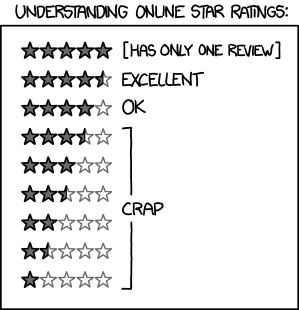
People can track beyond simply counting the number of times their things have been downloaded or (if there is a price on the item) purchased, Bodega has a few tricks up its sleeve. One is ratings. Most people are familiar with the common, and utterly useless, 5 star rating system seen in most online stores. This xkcd comic sums it up perfectly:


Instead of a single meaningless "star review", each type of content in Bodega has a unique set of attributes which you can use to rate an item in the store. Applications, for instance, feature the following attributes:


Games have attributes related to game play, wallpapers related to artistic qualities, books about the writing style and storyline .. you get the idea. This lets you provide useful feedback to the publisher, and allows the person whose item it is to understand better how people are perceiving their work.

You also do not have to leave a comment to leave a rating, or leave a rating to make a comment. This is a baffling misfeature we noticed in many other content systems out there. Of course, discussion is important as it communicates things simple ratings never can. Being Free software people, our first thought was to look around and see what kind of good discussion software existed already. We'd rather re-use than re-invent, after all. What we found was Discourse. The Discourse team uses the phrase "Civilized Discourse Construction Kit" to describe their forum software, and it is a thoroughly modern affair .. not to mention quite beautiful.

When you create a Bodega account, you can also use that same login to visit the Discourse forums. Immediate feedback and glancing at recent postings can also be done right from within the client software without having to go to a web browser. (That final bit of integration is currently sitting in a branch awaiting final merging for the next update.)

These forums are not the usual limited "leave a message" style affairs; they support fully threaded conversations with all the features we expect these days: private messages, being able to tag individuals in your comments, notifications of follow-ups and more. This is not about simply giving people a way to leave a 140 word message, but about actually engaging with each other.

Eventually we will provide integration with defect tracking and feature requests as well, making it a full life-cycle system.

Making a living


Many people simply want to share the things they create for no further reason than to share. This is a wonderfully human thing, and it's something we do ourselves every day as we create Free software. We also acknowledge that people need to and want to make a living. So Bodega supports the notion of paying for content.

Where Bodega diverges from the pack a bit is that money is not the currency. Instead, there is an in-system accounting mechanism based on points. In the Bodega install we host, you can buy points with money. Those points can be used to purchase items in the store that have a price. (How those prices are set will be covered in the next two blog entries.)


Used in other contexts, however, points might be handed out to students enrolled in a school, used as an incentive program in a company or .. just not used at all.

We will also be bringing tipping, pay-what-you-want and subscription systems in future updates. I'm even toying with providing a built-in crowd-funding feature. Best of all, because it is Free software, you can participate in helping define the mechanisms of trade.


.. oh, and you can download things and stuff


Of course, all of this is there to make it possible for you to browse, search, explore and ultimately get stuff. What we've talked about so far might seem a tad complex, but it is all hidden beneath the surface. The actual user experience is remarkably calm, simple and straight-forward.


Our goal has been create something simple to use and enjoyable to experience, but with a lot of intention and meaning behind every aspect of the system. It is like an ocean: wonderful to float around on, immensely deep.

Even when it comes to the "download things and stuff" bit there is this signature of care and thought. Downloading software, for instance, integrates with the system's package management. On Linux systems, we use PackageKit to meld with the operating system. You can even have software installed from a package repository .. without even knowing what a package repository is, if you must.

Other kinds of packages similar are handled by their 'native' systems: Plasma packages are installed with plasmapkg, eBooks go into your books folder, etc. If using the Plasma Active Add Ons app, it even integrates seamlessly with the semantic desktop system to transparently index the books, music and types of content you choose to access. All of this happens transparently and efficiently.

Updates are also handled in a similar fashion. When a new version of the content appears (be it an application, a book or whatever), you receive a notification in the notification area. Of course, if the application has been installed using the package manager from a repository, Bodega leaves it to the integrated software updater that comes with the operating system to handle it. Perfect harmony.

I'm sure you have questions


If you have questions, comments, ideas or other feedback, please leave them in the comments section below. I'll be hosting a Google+ Hangout at the end of this week where I will be gathering up your feedback and questions and answering them live, though you will be able to catch it later at your convenience on Youtube.
Read More
Posted in | No comments

Sunday, 20 October 2013

freedom and content distribution

Posted on 03:05 by Unknown
Tomorrow I will be creating stable branches in the bodega-server, bodega-client and bodega-webapp-manager repositories. This branch, to be named v0.1, will mark the first stable release of the content distribution system we've developed alongside Plasma Active.

Tomorrow will also see the first in a week-long series of daily blog entries about Bodega. These entries will detail what Bodega can do for you, exploring various use cases including that of someone:
  • browsing, searching for and downloading content
  • publishing content for download and/or sale
  • creating a store front and including that in an application, website, device or other product
Each entry will be split into a high-level tour of functionality that focuses on benefits, followed by a more technical look under the hood of that feature set.

Below are some screenshots of various pieces of the system as they stand right now to whet your appetite. If you wish to dive in a little further before tomorrow, you can visit the Bodega web service API docs and take a look at the draft documentation I've been working on for the management interface.


Plasma Active client for the Bodega content store
A Plasma Active client

Content management dashboard

Integrated forums

Live API docs

Read More
Posted in | No comments
Newer Posts Older Posts Home
Subscribe to: Comments (Atom)

Popular Posts

  • more plasma workspaces 4.8 news
    In my last blog entry on Plasma Workspaces 4.8 I talked about a number of things that we've worked on in the last six months. I promise...
  • what trains are for
    Today I had to go to Milan .. and back .. by train. That's a total of eight hours planted in a moving seat. I won't explain why I ha...
  • #merweek
    Make · Play · Live' s website is counting down to ... ? As Dario Freddi  noted in his G+ stream today, the week of the 25th is shaping u...
  • Improv and KDE
    When I announced the Improv ARM computer  on Monday, I did it on my blog which is also syndicated to Planet KDE. That's because there is...
  • a network
    Before I get to the positive strides we're making forward with Spark, I want to first apologize for not having the pre-order registratio...
  • an afternoon of small things
    I spent the afternoon working with some very small computers that we picked up today from a local shop that specializes in electronic parts ...
  • Call to authors
    For the last couple months I've been quietly working on a publishing deal for KDE books. I now have a contract in hand and we're mak...
  • bodega: partners, aggregating audiences and YOU
    I did a quick screencast today showing what "partners" are in Bodega and how they work. It's one of the many ways that Bodega ...
  • Break even weeks on bugs.kde.org!
    KDE developers around the world: we're currently just 14 closed bug reports away from a break even week! As of right now 475 bugs have b...
  • quick notes on using review board effectively
    The Plasma team has been using review board for quite a while. We were the pioneering project within KDE for its use, in fact, which leads t...

Blog Archive

  • ▼  2013 (56)
    • ▼  December (1)
      • 30.6%
    • ►  November (9)
      • Improv and KDE
      • Introducing Improv
      • Kate has won
      • what trains are for
      • bodega: partners, aggregating audiences and YOU
      • #merweek
      • fewer "omg what did i just do?!" in plasma desktop...
      • panel.autohide = true
      • on introducing new ideas to free software communities
    • ►  October (4)
      • distributing content with bodega
      • publishing content with bodega
      • bodega: it's all about the participants
      • freedom and content distribution
    • ►  June (3)
    • ►  May (8)
    • ►  April (3)
    • ►  March (11)
    • ►  February (11)
    • ►  January (6)
  • ►  2012 (49)
    • ►  December (1)
    • ►  November (8)
    • ►  October (5)
    • ►  September (4)
    • ►  May (7)
    • ►  April (5)
    • ►  March (2)
    • ►  February (11)
    • ►  January (6)
  • ►  2011 (93)
    • ►  December (3)
    • ►  November (4)
    • ►  October (2)
    • ►  September (7)
    • ►  August (18)
    • ►  July (11)
    • ►  June (3)
    • ►  May (10)
    • ►  April (15)
    • ►  March (7)
    • ►  February (3)
    • ►  January (10)
  • ►  2010 (105)
    • ►  December (1)
    • ►  November (8)
    • ►  October (5)
    • ►  September (8)
    • ►  August (11)
    • ►  July (6)
    • ►  June (6)
    • ►  May (5)
    • ►  April (7)
    • ►  March (10)
    • ►  February (16)
    • ►  January (22)
  • ►  2009 (167)
    • ►  December (2)
    • ►  November (8)
    • ►  October (16)
    • ►  September (10)
    • ►  August (9)
    • ►  July (9)
    • ►  June (18)
    • ►  May (10)
    • ►  April (26)
    • ►  March (12)
    • ►  February (16)
    • ►  January (31)
  • ►  2008 (30)
    • ►  December (19)
    • ►  November (11)
Powered by Blogger.

About Me

Unknown
View my complete profile